
Run one timer per client, as many as the day needs. Every running clock sits in the sidebar with its time on it, and the same client can never be booked twice.
Every change of hands costs a stop, a save and a restart, and the short blocks between two clients never get booked.
With more than one timer open, one stays on overnight. The month closes with a fourteen-hour entry nobody can explain to the client.
Stand-up for one client, review for another, a call back to the first: it all lands as one lump on whichever client was open.
A timer left running bills hours that were never worked. A timer never started loses hours that were. Both are found at month end.
A timer per client, and one place that shows them all.
Pick the client and project and start. Switch to another client and start a second one — the first keeps counting.
The clock in the header shows the tracker for the client you are looking at, so changing client never hides a running timer.
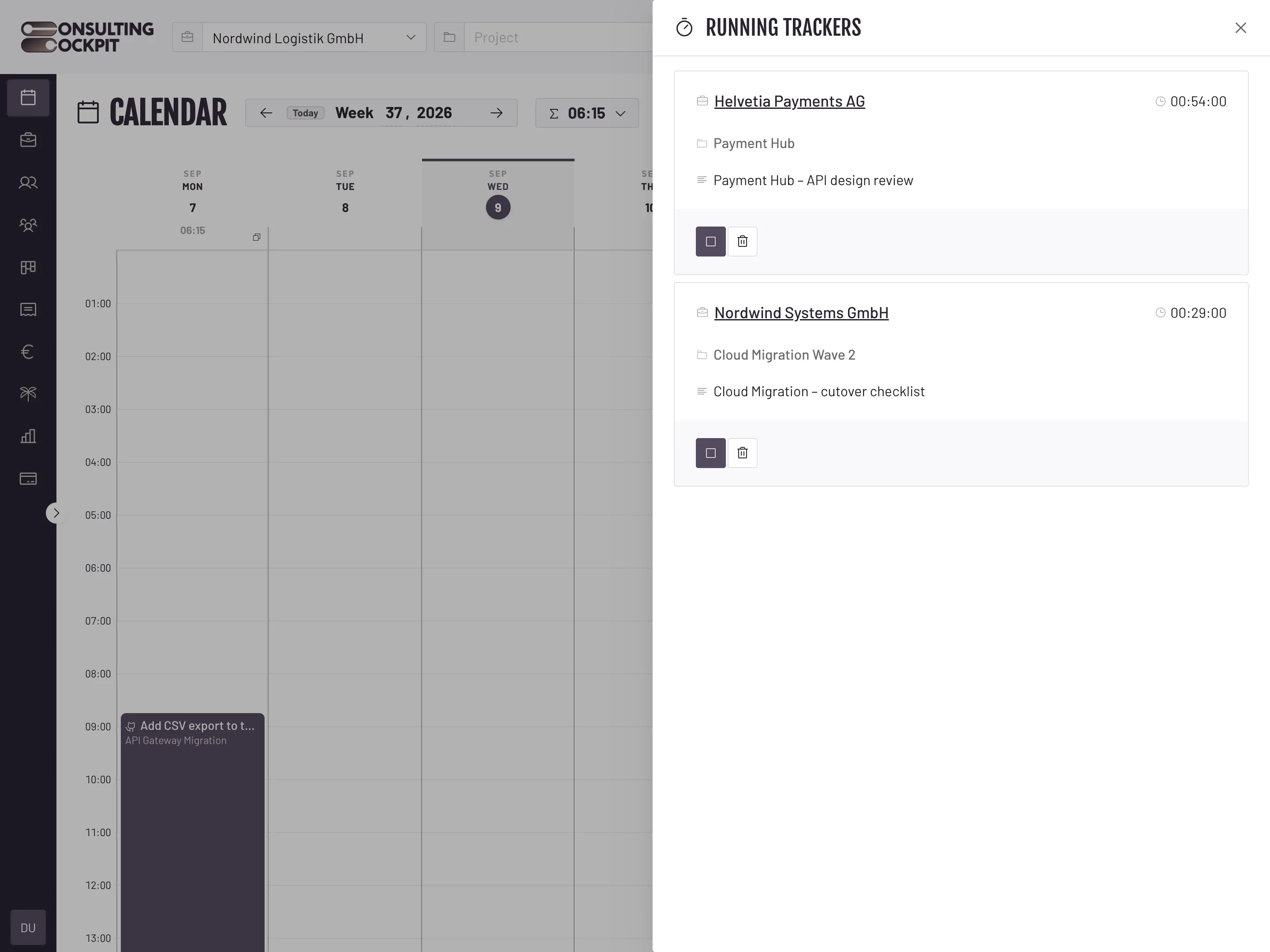
The Running panel carries a live count. Open it to see each client, its project and the time on the clock, and stop or discard any of them.
Ctrl+K, then Stop all trackings closes every open timer. Discard all trackings throws the unfinished ones away.
Leave requests, submitted timesheets, mentions and invoices appear as they happen. The bell keeps ringing until you have read them.
The checks that stand between a forgotten timer and a client's invoice.
An entry that overlaps a running or saved one for that client is refused, so parallel timers never inflate a single engagement.
After eight hours without a stop we email the consultant, so the entry is corrected the same day instead of at month end. Each person switches that reminder on for themselves.
Every running tracker sits in the sidebar with its client and the time on the clock, so one left on overnight is the first thing you see the next morning.
The clock runs on the account, not in the browser. Reload the page or move to another device and the same timers are still counting.
Every hour a parallel timer books is matched to the client's purchase order and priced at the rate that applies that day, see Budget Tracking
Yes. Each client gets its own timer and they all keep counting at the same time. Only a second entry that overlaps a running one for the same client is refused.
Across different clients, yes — that is what a split day looks like. Overlapping time entries for the same client are refused, so one engagement can never be double-billed.
The Running panel in the right-hand sidebar carries a live count. Open it to see each tracker with its client, project and the time on the clock, and stop or discard any of them.
It keeps running and stays visible in the sidebar. After eight hours we email the consultant, if they have switched that reminder on, and the start and end times can be corrected afterwards.
Yes. The timer is stored on the account, not in the browser, so a refresh, a closed tab or another device shows the same running clocks.
Leave requests and decisions, submitted timesheets, board mentions and comments, invoices issued, paid or reversed, and profile changes. Each category has its own email and in-app switch.
Run a timer for every client you work for and keep all of them in sight. Free for 30 days.